Gaussian Splats in Unreal: Plugin Comparison
As Gaussian splats continue to find their place in real-time production, the ecosystem of Unreal Engine plugins continues to expand. Each plugin offers its own approach to importing, rendering, relighting, and working with Gaussian splat data inside Unreal.
To better understand these workflows, Tyler Lewis tested Akiya, VIVE Mars, and Volinga using the same assets and production scenarios. This article shares observations from that process, highlighting each plugin's workflow, supported features, and behavior in Unreal Engine.
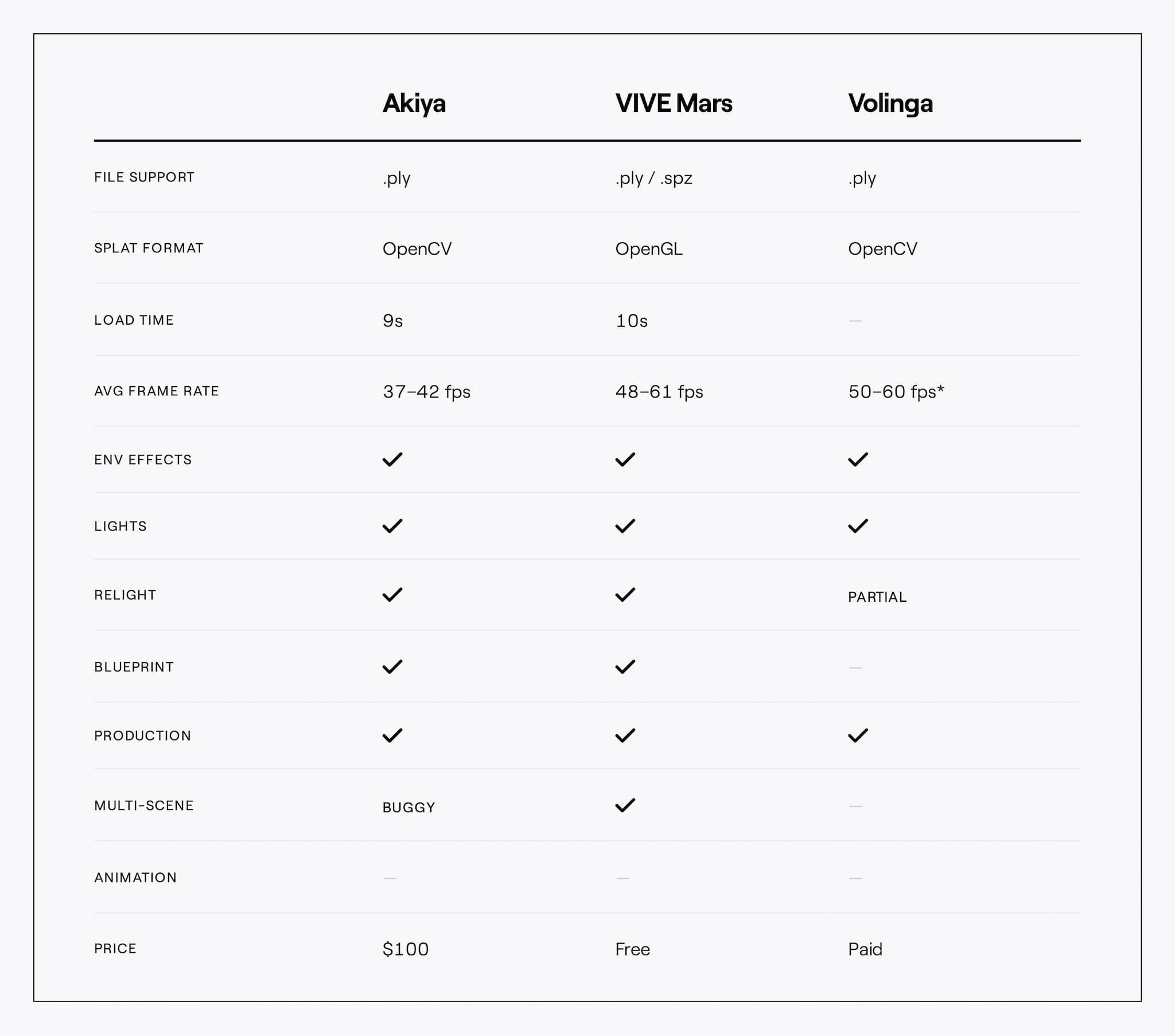
The accompanying comparison table summarizes the technical characteristics observed during testing, providing additional context alongside Tyler's notes.
Akiya
Akiya focuses on image quality and relighting, supporting dynamic lights and environment fog while producing consistent visual results across the test scenes.
The import workflow is straightforward, although only one .ply file can be imported at a time. Splats are imported as Blueprint actors, making it easy to pair them with collision meshes and integrate them into gameplay workflows. The importer also creates an organized folder structure for each asset, helping keep projects tidy. As the only plugin available through Fab, installation and updates are particularly simple, and several updates were released during the testing period.
During testing, Tyler found that scenes containing multiple splats required additional consideration, and enabling shadow casting introduced a noticeable performance cost along with some visual artifacts.
"Akiya stands out for its ease of use. It's incredibly easy to achieve great-looking results, and the relighting workflow is both intuitive and genuinely fun to experiment with. The plugin has proven to be stable, and it's clear the developers are continuously improving it." — Tyler Lewis
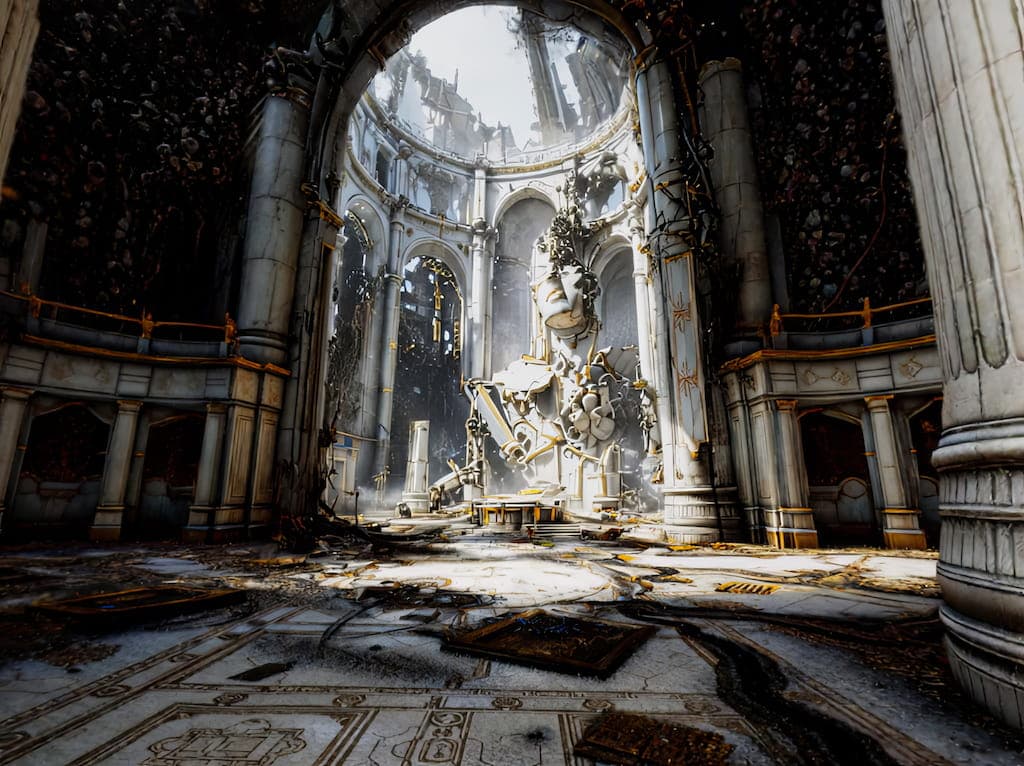
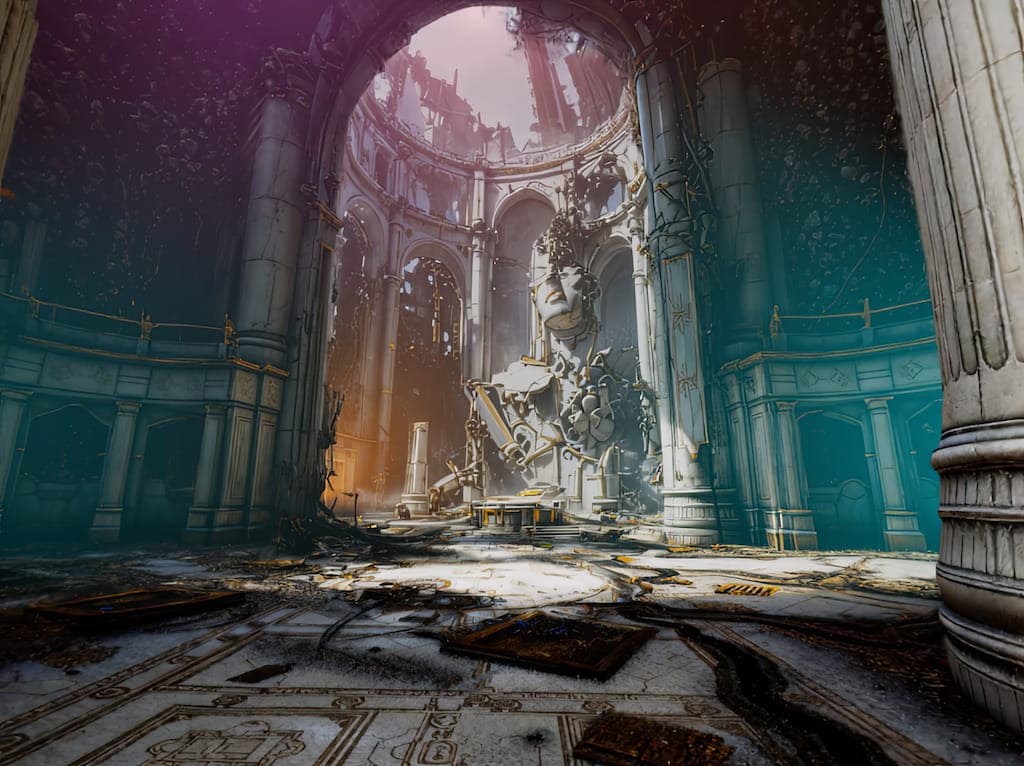
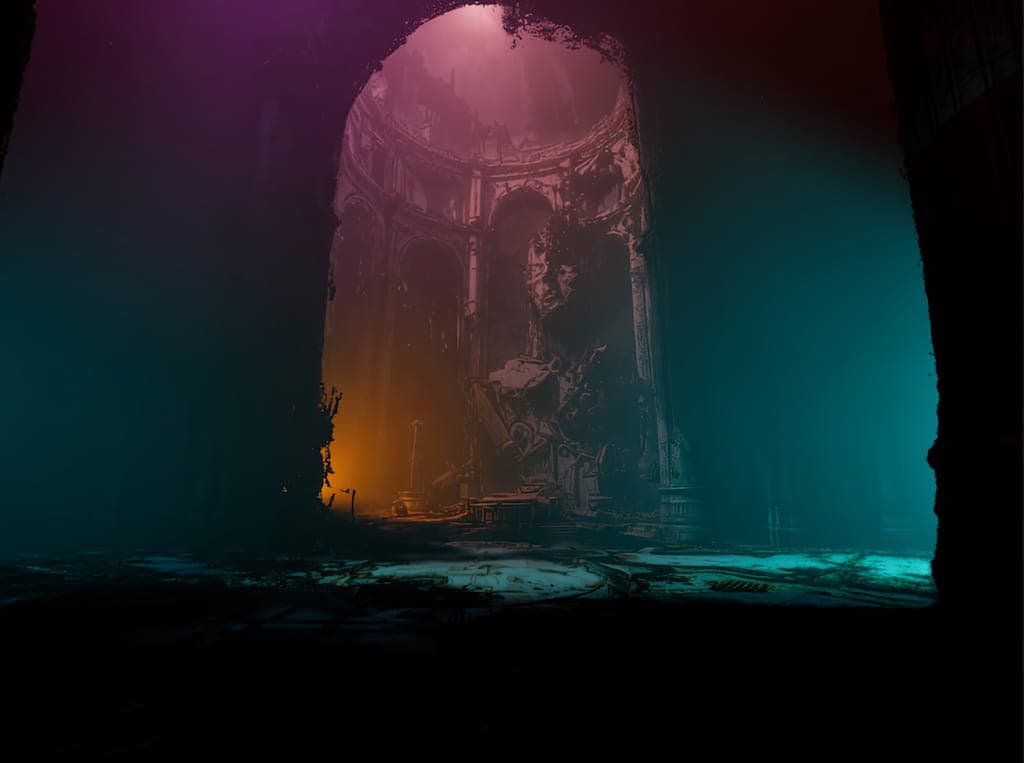
The images above demonstrate the different lighting modes available for the Splat Blueprint Actor and how they interact with scene lighting.
VIVE Mars
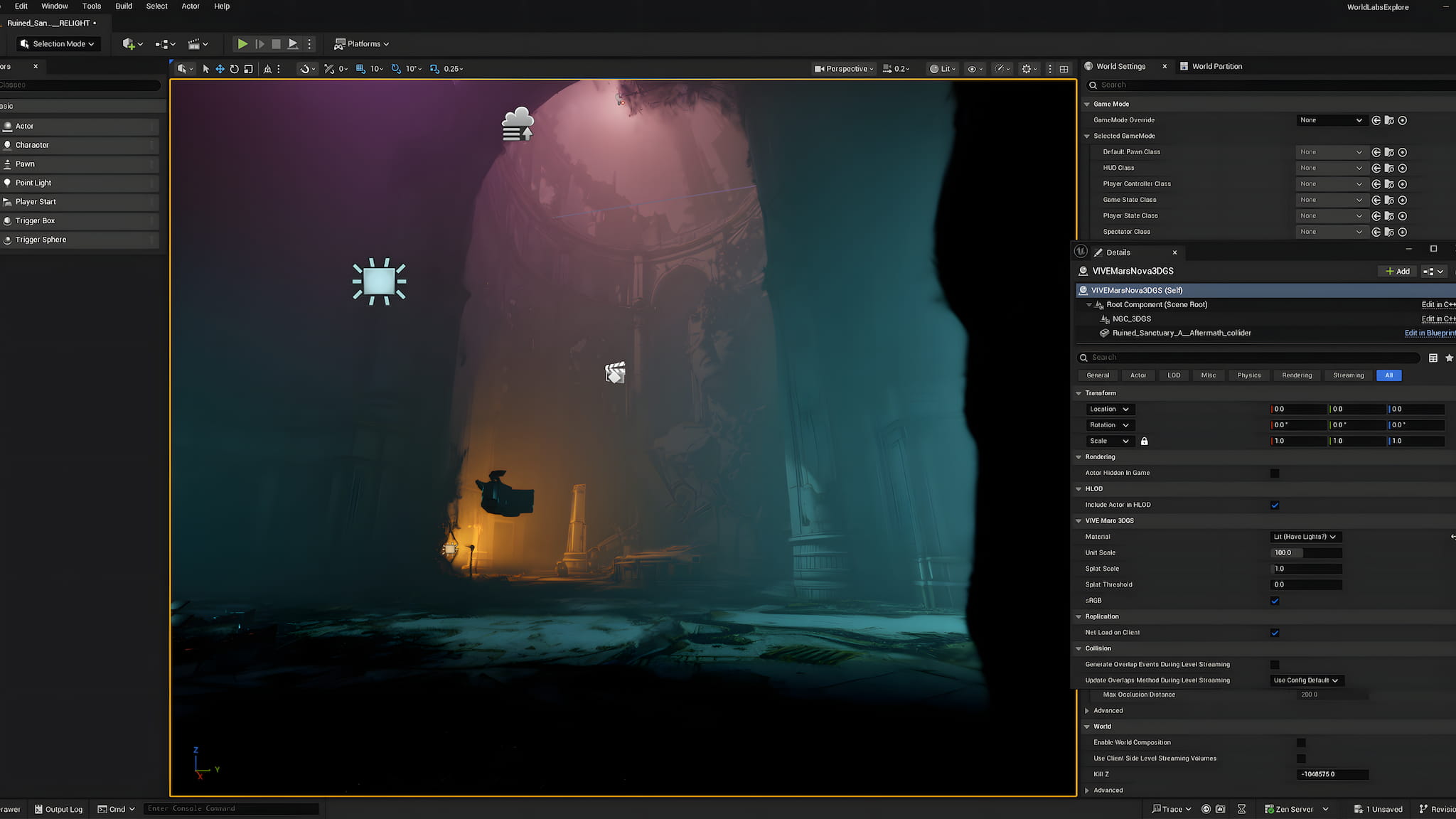
VIVE Mars emphasizes runtime performance while supporting lighting, relighting, environment fog, and both .ply and .spz file formats.
Splats are imported as Blueprint actors and the plugin supports multiple splats within a single scene, making it well suited to larger environments. Collision meshes are handled separately, providing flexibility when integrating assets into Unreal Engine projects.
Tyler observed that packaged applications take longer to load before the scene becomes fully available, and he noted some screen tearing that would benefit from additional refinement. Outside of those observations, the plugin maintained consistent performance across the test scenes.
"VIVE Mars delivers excellent performance and runs well across a broader range of hardware. Support for both .ply and .spz formats makes it a compelling choice from a production pipeline perspective. It also has me genuinely excited about the future of Gaussian Splats in VR." — Tyler Lewis
Full Relight Capability
Volinga
Volinga explores a different workflow by combining Gaussian splats with in-engine editing tools and multiple lighting approaches, including approximated normals and mesh-based normals.
Its mesh-based workflow allows lighting to be driven by the Volinga Mesh Actor, enabling dynamic lighting effects while also helping reduce some of the visual noise commonly associated with splat rendering. Tyler found these editing capabilities to be one of the plugin's most distinctive features.
The current workflow requires additional setup compared with the other plugins. Blueprint support is not yet available, Nvol assets and Volinga Mesh Actors are managed separately, and packaging projects require a Pro license. Fine-tuning lighting also requires some experimentation as renderer changes are not always immediately visible.
"Volinga shows tremendous potential. I especially appreciate its integrated editing tools and the normal-based mesh lighting workflow. I was impressed with the mesh-based normals; it helps mitigate some of the splat noise that you would want to remove in post. If it eventually adds Blueprint support and a relighting workflow comparable to Akiya or VIVE Mars, it could become an even stronger option." — Tyler Lewis
The Volinga mesh material color affects the surrounding fog, making it possible to create unique atmospheric effects.
Key Observations
Testing across Akiya, VIVE Mars, and Volinga highlighted how quickly the Unreal Engine ecosystem for Gaussian splats is evolving. While each plugin follows a different workflow, several common themes emerged throughout the evaluation.
- Support for dynamic lighting and relighting continues to improve across Unreal Engine plugins
- Blueprint integration, import workflows, and scene authoring vary considerably between implementations
- Performance and hardware requirements differ depending on rendering approach and feature set
- File format support, editing tools, and production workflows continue to expand as plugins mature
- Active development across the ecosystem is rapidly introducing new capabilities and refining existing workflows
The sections above capture Tyler Lewis' observations from hands-on testing, followed by a comparison of the technical characteristics observed during the evaluation.
Looking Ahead
The Unreal Engine ecosystem for Gaussian splats is still evolving. While today's plugins already offer compelling workflows for rendering and relighting, each comes with its own strengths and compromises. None yet combines the image quality of Akiya, the performance of VIVE Mars, and the flexible editing tools introduced by Volinga into a single production-ready solution.
With Unreal Engine 5.8 now available, we're excited to see how plugin developers take advantage of the engine's latest rendering and lighting improvements to build more complete Gaussian splat workflows.
As the ecosystem matures, World Labs will continue testing new plugins, sharing workflows, and publishing tutorials that help creators get the most out of Gaussian splats inside Unreal Engine.
The technology is moving quickly, and we're looking forward to the next generation of tools that make capturing, relighting, and deploying Gaussian splats feel like a native part of the Unreal workflow.
"I was genuinely impressed by the current state of Gaussian Splat plugins for Unreal Engine. There isn't a single 'right' choice—each plugin is capable of producing excellent results, and the best one ultimately depends on your project's needs and pipeline. Personally, I gravitate toward Akiya because of its simplicity and how enjoyable the relighting workflow is; it's incredibly fun to tell a new story with an existing scan. At the same time, I'd keep a close eye on Volinga—Blueprint support would be huge!" — Tyler Lewis