April 14, 2026A technical deep dive into Spark 2.0's streamable, Level-of-Detail system for 3D Gaussian Splatting.
Streaming 3DGS worlds on the web
Spark is a dynamic 3D Gaussian Splatting (3DGS) renderer built for the web. It integrates with the web's most popular 3D framework THREE.js and uses WebGL2 to run on any device with a web browser, including desktop, iOS, Android, and VR.
Launched last year, Spark brought with it many features that no other renderer had: the ability to render multiple 3DGS objects in the same scene, real-time editing and relighting, and a shader graph system that allows users to create fully dynamic splat-based effects and animations.
With Spark 2.0 we've added a Level-of-Detail (LoD) system that can stream and render huge 3DGS worlds on any device. As you move around the world, Spark automatically optimizes the 3DGS detail level for the viewpoint and streams the necessary data over the Internet.
In this post we'll do a deep dive into the technical details that make this possible, and learn some computer graphics and systems engineering along the way. Already familiar with 3DGS? Skip introduction and jump to Spark 2.0 LoD method.
3D Gaussian Splatting
Scanning the world and turning it into 3D data on a computer, known as photogrammetry, has been improving quickly with the advent of Machine Learning techniques. The introduction of 3D Gaussian Splatting made it possible to render these scans interactively on consumer devices.
In traditional 3D graphics we represent the surfaces of objects using texture-mapped triangles. But with 3DGS we instead use millions of semi-transparent, colored ellipsoids known as splats that blend together to form all the surfaces and tiny details.
Click to view in 3D: Rendering the same object using texture-mapped triangle meshes (left) and Gaussian splats (right).
Each splat has the following properties: its center location in space
Click to interact in 3D: Adjust the properties that control a 3D Gaussian Splat's appearance: its center, XYZ scales, rotation, opacity, and color.
The most common way to render these splats to the screen is the painter's algorithm where we sort the splats back-to-front, then draw them on top of each other, blending the semi-transparent areas together using the "over" operator. Each 3D ellipsoid is projected to the image plane as an approximate 2D ellipse, and for each pixel in the ellipse we compute the opacity from its Gaussian, and finally blend its color
Spark's origins
Spark started out as an internal 3DGS renderer developed by World Labs because existing web renderers had shortcomings that would limit us in the future. For example, they could only correctly render one 3DGS object at a time, they couldn't dynamically animate the splats (colloquially known as "4DGS"), they were based on less popular 3D frameworks, or used WebGPU which isn't available on all devices. This renderer was featured in our 2024 Large World Model research preview and early world showcase Lofi Worlds.
Click to experience in 3D: Lofi Worlds - a relaxing journey through atmospheric 3D worlds created by Marble. Best experienced in VR on Quest 3 or Apple Vision Pro.
But we wanted anyone to be able to build interactive 3DGS web experiences, so we decided to take our learnings and build a general-purpose, open-source 3DGS renderer. We chose to build it on top of the web's most popular 3D framework THREE.js, capable of making complex 3D experiences in the browser, even with vibe coding. We also targeted WebGL2, the only 3D web API that is almost guaranteed to run on every device today.
Spark was developed alongside Marble, which lets you create 3D worlds in the web browser using our multi-modal world model. This served as a concrete use case that helped shape Spark into a flexible, user-programmable 3DGS processing engine, and also as a demonstration for what could be built with Spark.
Spark system design
We wanted to be able to construct huge worlds by joining 3DGS objects together, and to do this correctly you have to sort all the splats across different objects in a unified back-to-front order. Without this, objects only sorted locally look like they are "pasted over" each other rather than coexisting in the same 3D space.
Click to experience in 3D: Comparison of incorrect local-only splat sorting vs. globally-sorted splats
3DGS is also a rapidly evolving field, and we wanted users to be able to experiment with new techniques for relighting, animation, real-time editing, or other creative/interactive effects. We wanted Spark to be flexible enough to handle these use cases without needing to continually modify Spark's core systems.
Spark addresses these using a three-step algorithm:
- Generate one global list of splats from across all 3DGS objects, transformed into the same space
- Sort this global list back-to-front for the current viewpoint
- Render the splats in that order
1. Generating a global list of splats
Step 1 iterates over each 3DGS object, contributing its splats to a global list. Because each 3DGS object can be independently positioned and oriented in space, we must at a minimum transform the splats into the same coordinate system.
Click to experience in 3D: Spark renders dynamic, correctly-sorted 3D Gaussian Splats with a 3-step process: 1) Generate a global list of animated splats for the current frame, 2) Sort the splats back-to-front, 3) Render the splats back-to-front.
Spark takes this opportunity to run a customizable data pipeline on each splat on the GPU. This opens the door to all sorts of possibilities: recoloring the splats, adjusting opacity, SDF-based clipping, animated transitions, interpolating between scanned 4DGS frames, and more. This pipeline is user-programmable, using either GLSL or by connecting nodes into a computation graph (akin to shader graph systems in 3D engines). Each 3DGS object can run its own pipeline, mixing and matching effects within a scene.
2. Sorting the splats
Although the sorting in step 2 is possible to do on a modern GPU, the programming model provided by WebGL2 makes it prohibitive. Instead, Spark calculates splat distances on the GPU and reads back this list to the CPU. These distances are then sorted using a two-pass radix sort in a background Web Worker thread. Spark generalizes this further, allowing you to do this with multiple viewpoints simultaneously, each with its own sort order.
3. Rendering the splats
Once we have a global list of splats and their ordering, in step 3 we do a single instanced draw call that draws all the splats in one go. Each splat is rendered as an oriented quad (technically two triangles) enclosing the splat's projected 2D ellipse. The four vertices are calculated using a custom vertex shader, then the fragment shader computes the opacity for each pixel by evaluating the Gaussian profile, and finally the GPU hardware blends the color into the frame buffer.
Scaling up to huge worlds
Since Spark's initial launch, 3DGS has been growing in popularity but also in scale. 3D scans today often exceed tens of millions of splats, and World Labs is generating bigger and better worlds that can be expanded and composed into huge labyrinths.
However, most consumer devices can only render 1-5M splats at interactive frame rates. Large scenes need to download 100+ MB or even 1+ GB 3DGS data before displaying it. Mobile device browsers have a cap on GPU memory utilization, limiting the size of worlds that can be shared reliably online.
Spark 2.0
The new Spark 2.0 is a complete solution for preparing, streaming, and rendering huge 3DGS scenes on the web on every device.
It employs three graphics and systems techniques to address the scaling challenges:
- Level-of-Detail: Preparing lower-resolution versions of the splats and calculating which subset of splats to render for the camera viewpoint. By rendering fewer splats when they're too far away to make out the details, we can improve rendering performance.
- Progressive Streaming: Loading in 3DGS details in a coarse-to-fine manner as data is downloaded, prioritizing data that will best resolve details depending on where the camera is looking.
- Virtual Memory: Allocate a fixed GPU memory pool for a splat page table that automatically swaps in and out chunks of 3DGS data as needed depending on where we are in the scene, giving access to huge pools of splats across multiple 3DGS objects fetched over the Internet.
Level-of-Detail
A common technique in computer graphics to handle large 3D scenes is to use a Level-of-Detail (LoD) system that automatically adjusts the amount of detail rendered depending on the distance to the viewer. The detail can also be lowered to get a higher frame rate, or increased when the viewer stops moving.
A classic example of LoD is Mip-mapping where a texture is downsampled into a pyramid of smaller textures, each texture level half the size of the previous, with a single pixel at the top. This allows us to quickly sample a texture pixel roughly the same size as a screen pixel at any distance from the camera.
A well-known modern LoD system for triangle meshes is Unreal Engine's Nanite which creates a hierarchy of triangle clusters at varying levels of detail and selects a subset of clusters to render at just the right level of detail depending on the viewpoint.
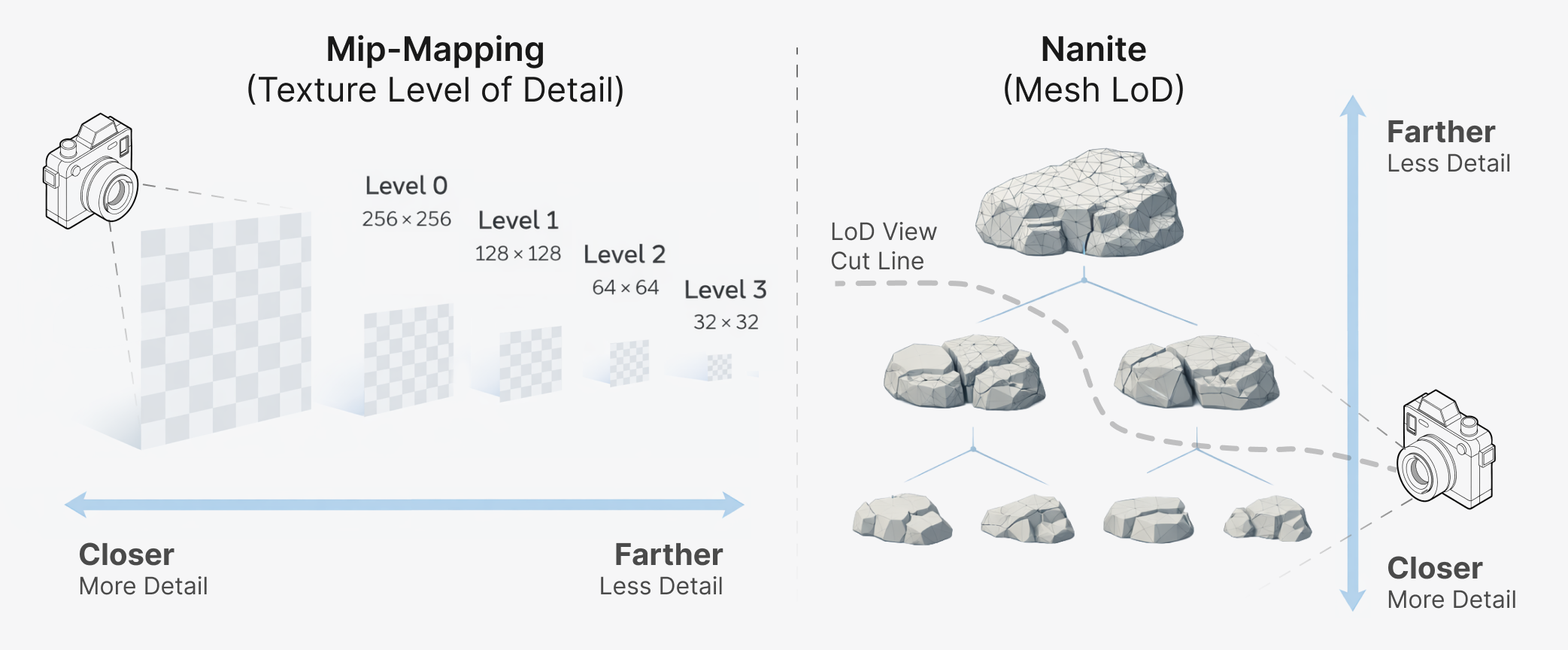
Left: Texture LoD using Mip-mapping with a pyramid of lower-resolution textures.
Right: Mesh LoD with Nanite with a hierarchy of triangle clusters, allowing selection of meshes with appropriate detail.
Different LoD approaches can exist on a spectrum from discrete to continuous LoD methods. Discrete LoD involves creating several different versions of the splats from small to large splat counts, then swapping between the versions depending on the distance between their approximate bounds and the camera.
Although Spark's original system design supports this model out of the box, this approach results in "popping" artifacts when moving around and suddenly switching between versions, and has visible boundaries when grouping splats into tiles.
Level-of-Detail Gaussian splat tree
Spark's LoD design is a continuous LoD method, where all splats exist in a hierarchy, an LoD splat tree. Spark individually select splats along a boundary cut of the tree that optimizes the splat detail within the viewport.
Each internal tree node is a lower-resolution version of its children, formed by merging the splats into a new one that approximates the shape and color of the child splats. This continues all the way up to the root of the tree, a single large splat that has the aggregate shape and color of all the splats in the object.
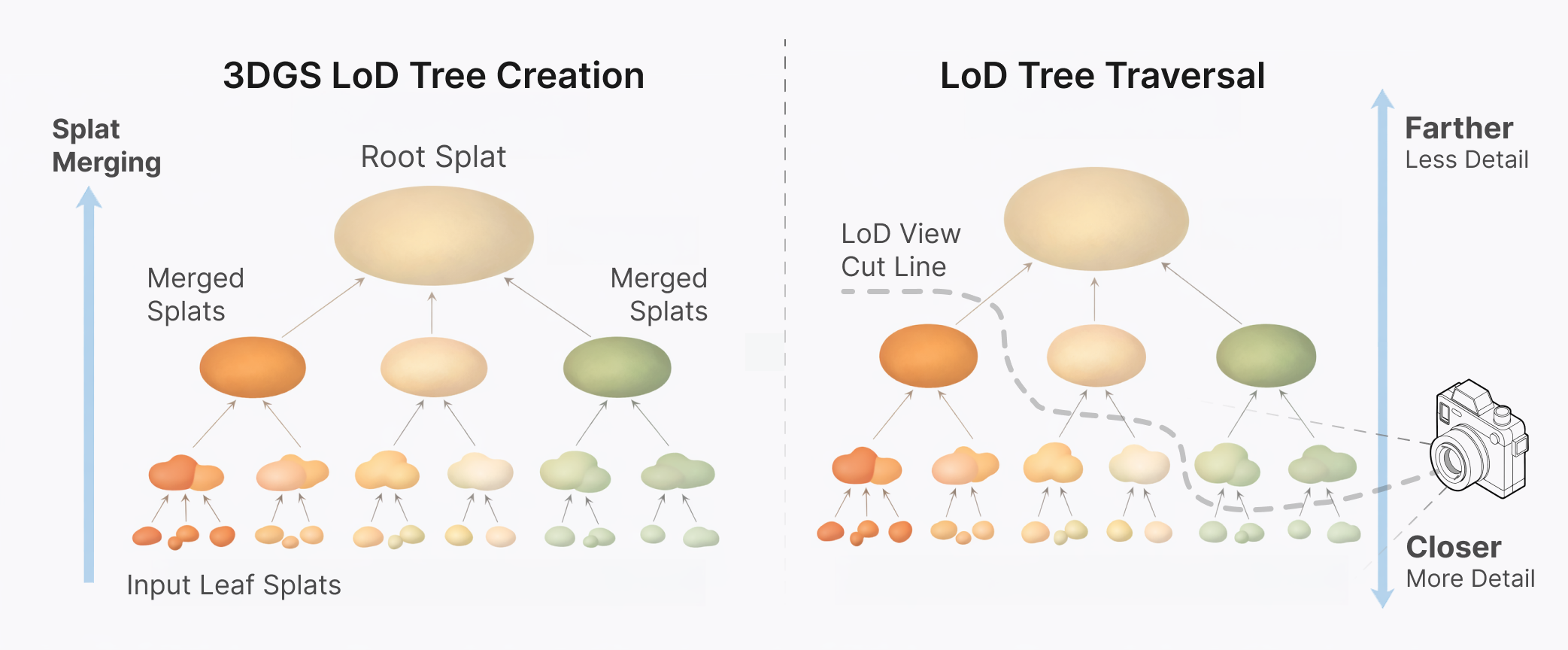
Left: LoD splat tree generated by merging input leaf splats into larger interior node splats up to a single root splat.
Right: Spark computes a tree cut that selects splats to render depending on the current viewpoint.
Using this LoD splat tree, Spark computes "slices" through it that selects the best set of
Click to experience in 3D: Spark adjusts the 3DGS detail level continuously depending on the camera view frustum, and streams chunks of data over the Internet as needed (shown with green flashes).
LoD splat tree traversal
Spark computes the best subset of LoD splats to render for the viewpoint by traversing the splat tree in
- Starting from the LoD splat root
, compute its screen dimension , and insert into the priority queue. - Pop the maximum sized LoD splat
from the priority queue. If is smaller than 1 pixel or is a leaf node, add it to the output set, and repeat step 2. - If replacing the LoD splat by its children would exceed the splat budget
, move all the remaining queue splats to the output set and stop the algorithm. - Otherwise, for each child
of parent , compute the screen dimension and insert into the queue. Finally, repeat step 2.
Click to interact in 3D: Spark traverses the LoD splat tree from coarse to fine levels to compute a tree cut that balances splat pixel sizes within a budget of N splats.
Spark implements this algorithm in Rust compiled to WebAssembly (Wasm) to run efficiently in a background Web Worker so that LoD updates run asynchronously and don't impact the main render loop.
Composite LoD splat scenes
Spark generalizes this algorithm further by traversing multiple instances of LoD splat trees simultaneously. Instead of starting with a single root, for each 3DGS object
This allows us to easily create huge composite worlds by simply adding 3DGS LoD objects anywhere in space, and Spark will compute the best global subset of all LoD splats to render each frame.
Click to experience in 3D: Composite worlds created from multiple 3DGS objects, each with an LoD splat tree. Spark traverses them simultaneously to produce a unified level-of-detail rendering.
Foveated splats
Spark implements fixed foveated rendering that biases the LoD splat budget toward the center of the view direction. This increases the level of detail in the viewing direction, allocating fewer, larger LoD splats to the sides and behind the viewer.
Since Spark computes the LoD splat screen dimension
We call this scaling factor the foveation scale
Spark uses four LoD parameters to control the view-dependent level-of-detail:
- coneFov0: Angle of a cone around the view direction with
and full resolution. - coneFov: Angle of a larger cone that will have its detail reduced by coneFoveate.
- coneFoveate: Foveation scale at the edge of coneFov, smoothly interpolating
as the angle goes from coneFov to coneFov0. Setting this to results in 10x larger splats. - behindFoveate: Foveation scale behind the camera, varying smoothly over
from coneFov to 180 degrees.
Click to interact in 3D: Spark's LoD system uses foveated rendering to focus splat detail where the camera is looking.
Generating LoD trees
Using its command-line tool build-lod, Spark can convert any 3DGS file into an LoD splat tree encoded in a new streamable .RAD file. Alternatively, it can load any file in the web browser and create the LoD tree on-demand using a background Web Worker. Both run the same Rust code, which compiles to both Wasm and native environments.
Spark 2.0 includes two algorithms for creating LoD splat trees: 1) a quick and compact algorithm called Tiny-LoD used by default when run on the web, and 2) a higher-quality Bhatt-LoD used by default on the command-line.
Both methods are "training-free" and don't require any reference images or other inputs, instead operating directly on the 3DGS data. Other tree generation methods are also possible, for example NanoGS could be used to generate a LoD tree.
Tiny-LoD algorithm
This method is meant to be used "on-demand" where the priority is producing a reasonable LoD splat tree quickly without using too much memory. It is based on an older voxel octree algorithm we called Quick-LoD but uses a memory optimization technique from computational genomics.
We divide space into a grid of cubes, and allow the step size of this grid to vary by
We process one
Click to experience in 3D: Tiny-LoD generates an LoD splat tree by merging splats that fall within grid cubes, iterating up a hierarchy with larger grids until all splats are merged into a single root.
In computational genomics it's common to have to find data that contains the same substring of
- Instead of a hash map, create one contiguous array of
for each splat we insert, where . - Sort this array by
, after which all splats with the same will be adjacent in the array. Although sorting is , this is often faster than hashing because it has better cache locality. - Iterate over grid cells by chunking the array beginning-to-end into groups of splats with the same
. - Merge these groups of splats into new LoD splats.
- Repeat step 1 at the next larger
.
Although
Bhatt-LoD algorithm
This method is named after Bhattacharyya and the Bhattacharyya distance, which is used to compute the statistical overlap between two 3DGS shapes. Like Tiny-LoD it merges splats from bottom to top, but picks pairs of splats to merge based on how similar their shapes and colors are. It is intended for "off-line" use where we prioritize quality over speed.
Bhatt-LoD iterates over all the input splats organized into a priority queue, starting from the smallest splat and working up to the largest. For each splat
To compare splats
Because Bhatt-LoD always merges pairs of splats, if we start with
Progressive Streaming
Spark 2.0 defines a new file format .RAD (for RADiance fields) that compresses 3DGS data and enables random access streaming for progressive refinement as data is transferred across the Internet. 3DGS objects appear almost instantly as a coarse 64K splat approximation of all the splats. Data chunks are fetched to refine the coarsest visible LoD splats first, reprioritizing as the viewer moves around the scene.
Problems with existing 3DGS file formats
The two most common file formats for 3DGS data are the original .PLY and .SPZ, which represent two different styles of encoding data: row-oriented and column-oriented:
- .PLY: After a plain-text header, stores all the properties of splat 0, then all the properties of splat 1, and so on, known as row-order. Each value is encoded as a float32, nothing is compressed. 10M splats with SH0..3 may consume up to 2.3 GB of data.
- .SPZ: Encodes data in column-order, storing the center coordinates for all the splats first, then all the splat opacities, and so on. Each property is stored in fewer bits with reduced precision, for example 0..1 opacity is encoded as 0..255 in one byte. All the columns are concatenated and compressed as a GZ stream. 10M splats with SH0..3 consumes much less data at 200-250 MB.
Because a .PLY file is stored in row-order, we could progressively load splats by showing them as soon as the data is received. But it is uncompressed and its encoding precision is wasteful. An .SPZ file stores similar types of data together in column-order, which results in better compression. Unfortunately it can't be progressively loaded because the entire file must to be received before any splat has all its properties.
.RAD file
To achieve our goal of a compressed, efficient, streamable format for 3DGS, we developed a new file format .RAD. Our goals were that it should be simple to encode/decode, extensible, have selectable encoding precision, and allow random access.
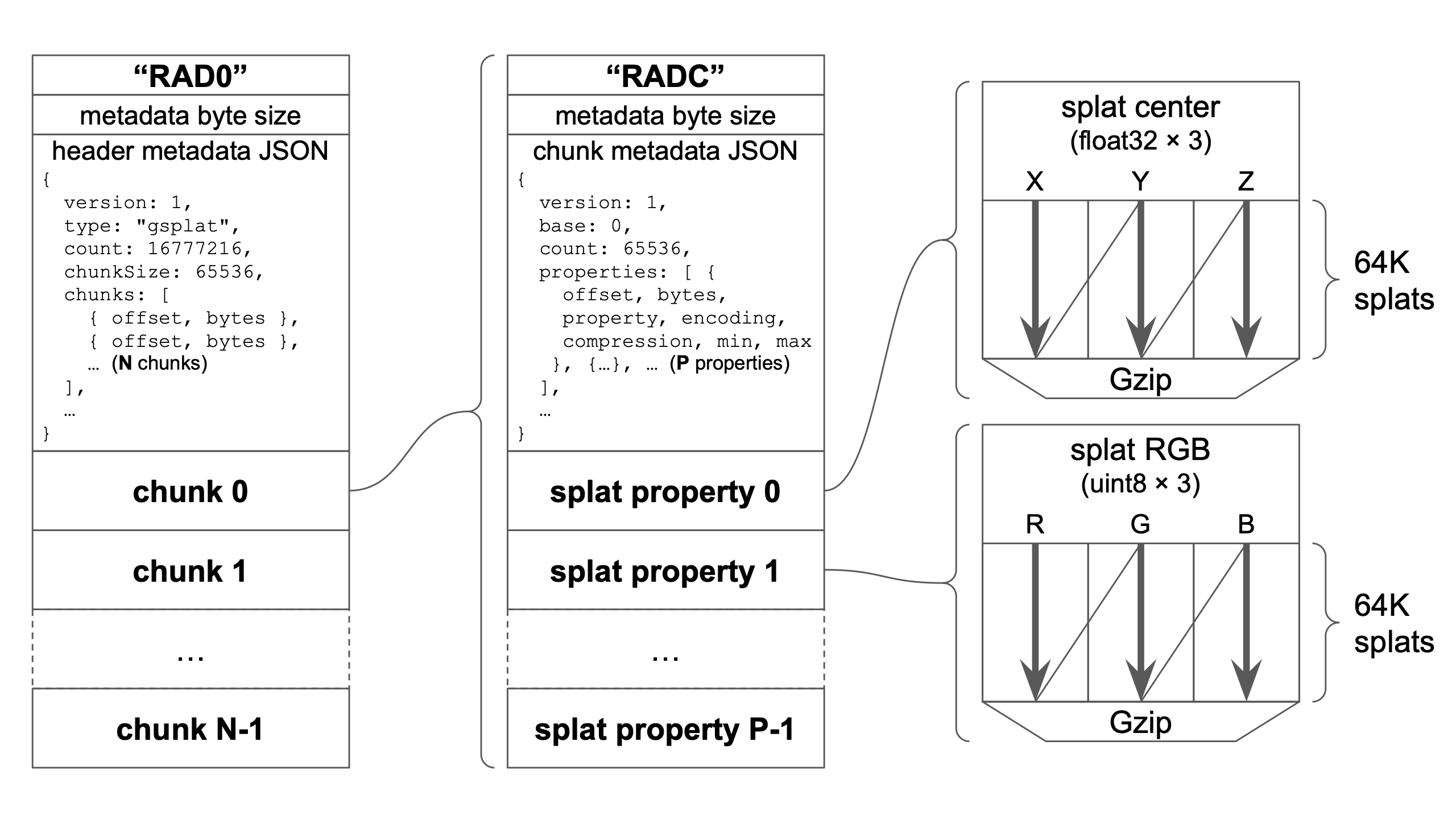
RAD file structure, consisting of an extensible JSON metadata header followed by randomly-seekable chunks. Each chunk is a RADC file with JSON header and the properties of a 64K chunk of splats, encoded and compressed in column-order.
The file structure is simple: the header RAD0, the byte size of the header metadata, the metadata JSON, followed by one or more chunks of 64K splats. The header metadata contains the offsets and byte sizes of all the chunks, which allows us to fetch chunk data in any order.
Each chunk itself uses a similar format: a header RADC, the size of the chunk header metadata, the metadata JSON, followed by the compressed data for 64K splats. The splat properties are stored in column-order with customizable encodings specific to each property. Each property is compressed using Gzip, which performs well because similar data types are stored together.
Because the headers are encoded as JSON it ensures future extensibility using the version field and by adding new optional fields. Data type encodings and compression algorithms are selected using string names in the metadata, allowing new strings to be added in the future.
Spatially partitioning LoD tree
An LoD splat tree can be thought of as existing across four dimensions: three spatial dimensions and a level-of-detail dimension. In order to do progressive refinement with streaming, we need to carefully organize the LoD splats into chunks in the .RAD file.
There are many strategies possible here, but Spark's method aims to have splat data spatially co-located by subdividing space into recursively smaller regions. Chunks of 64K are filled with splats within these spatial regions from largest to smallest, resolving as much detail as possible within the chunk.
The first chunk has no spatial bounds and starts with the root splat at index 0, then its children, then their children in order of decreasing size until we have reached 64K splats. We then subdivide space into AABB regions and recurse on each region, adding splats within the regions until they fill a 64K chunk. These regions are further subdivided and the process continues until all splats have been output to a chunk.
Click to interact in 3D: Spark LoD trees are partitioned into chunks that are spatially co-located and resolve as much detail as possible within 64K splats.
With this strategy, the first 64K chunk of splats loaded are the largest 64K splats in the tree, allowing a coarse version of the splats to be rendered almost immediately. Each additional chunk of 64K splats delivers as much detail as possible within spatially subdivided regions. This way, we can fetch chunks corresponding to regions near the viewer and resolve details quickly.
Traversing LoD trees with missing chunks
Spark streams .RAD files by loading entire chunks, but chunks may be loaded in any order after chunk 0 depending on which chunks best resolve detail in the viewport. By keeping track of whether each chunk has been loaded, the LoD traversal algorithm can quickly determine if a splat's children have been loaded. If not, the parent splat is rendered instead, awaiting further refinement once the data is received.
While traversing the LoD splat tree, Spark keeps a list of chunks visited and their order, including chunks not yet loaded. Since the traversal algorithm refines splats from largest screen size to smallest, chunks earlier in the list contain larger splats than chunks visited later.
Spark therefore uses this chunk visit order to prioritize .RAD file chunk fetching. It constantly recalculates the highest priority chunks based on camera viewpoint, and uses 3 parallel Web Workers to fetch and decode the data in the background.
Virtual Memory
Virtual Memory is a memory management technique to provide access to huge amounts of idealized "virtual memory" through a fixed pool of real "physical memory". A page table is used to map between the virtual and physical in fixed-size pages.
Spark 2.0 adapts this technique to 3DGS, allocating a fixed pool of 16M splats on the GPU and automatically managing the mapping between 64K splat GPU "pages" and virtual 64K chunks of .RAD files. Chunks are loaded into empty pages based on LoD traversal ordering. Chunks are evicted when the page table is full and their priority is lower than new chunks that need to be fetched, in a least-recently-used fashion.
Click to experience in 3D: 3DGS data is organized into chunks/pages of 64K splats, loaded as needed by the camera viewpoint into a unified GPU page table, swapped out for other data in an LRU fashion.
Spark's design allows multiple .RAD files to be fetched simultaneously and share the same page table. For each .RAD file we store its mappings from chunk to the page table, and the converse mappings from page table to file and chunk. During LoD splat traversal over multiple LoD splat trees, we keep track of chunk and file visit order. The result is a global priority ordering across all files and chunks together, allowing us to optimize fetching and storage across splats from all 3DGS objects in the scene.
Summary
Spark is a 3DGS renderer for THREE.js and WebGL2 with a user-programmable GPU splat processing engine. The new Spark 2.0 adds a 3DGS Level-of-Detail system that adjust the detail level continuously, rendering splat details where you're looking. A new 3DGS file format .RAD enables streaming with progressive refinement, and a virtual splat paging system provides access to infinite splat worlds with a fixed GPU memory allocation.
Explore Spark 2.0 creations
Starspeed — by James Kane
Starspeed is a multiplayer spaceship shooter with a 10-song synthwave OST and gripping story by Webby-winning artist and developer James C. Kane. Made with World Labs' Marble and Spark.js plus Blender and three.js, STARSPEED streams kilometer-scale sci-fi environments made of 100,000,000+ gaussian splats directly through the browser with the .rad format.
Click to play: Starspeed by James Kane
Dormant Memories — by Hugues Bruyère
Dormant Memories is a series of interactive scans by Hugues Bruyère, co-founder and chief technologist at Dpt., a creative studio focused on interactive and immersive experiences. The work captures real-world locations and presents them as explorable environments built with Marble, connecting documented spaces with imagined ones to explore atmosphere, memory, and alternate versions of place.
Click to experience: Dormant Memories by Hugues Bruyère
Explore Massive Captured Spaces — by Fujiwara Ryū
Fujiwara Ryū of Hololive’s Spatial Information Technology Division demonstrates large-scale 3D Gaussian splatting with multiple captured scenes containing up to 40 million splats. The experience runs smoothly on smartphones and is also compatible with Quest and Vision Pro.
Click to experience: Explore Massive Captured Spaces by Fujiwara Ryū
3DGS + You?
If you found this post interesting, check out our GitHub repo. Clone the repo and test out the Spark examples. Learn more about Spark and its capabilities in the Spark docs. Learn how to get started with the new LoD system.
Need some 3DGS data for your projects? Try World Labs Marble, where one line of text or an image is all you need to create a 3DGS world. Use Marble Studio to join your creations into huge sprawling worlds. Make a 3D web app that renders your world using Spark LoD, and share it with all your friends!
If you're new to programming or graphics, modern LLMs are now capable of generating entire THREE.js games from a few lines of English text. Using Spark and Marble anyone can create a 3D experience for the web!
Spark aims to expand what's possible with 3DGS. If you found the technical details on Spark and its LoD system useful, it is open source and you can build on the code and ideas. Every 3D example in this post is a single-page HTML file with linked 3D assets. View Source in your browser and edit it to your liking!
Finally, if you found this write-up interesting and are excited by World Labs' vision, come join us!
Read More
March 3, 2026
3D as code
Text became the universal interface for software; 3D is becoming the universal interface for space. It’s the medium that allows humans and AI systems to generate, edit, simulate, and share worlds together.
February 18, 2026
World Labs Announces New Funding
An update on our vision for spatial intelligence in 2026.